RV There Yet is designed for co-op gameplay, supporting 1-4 players. While RV There Yet can be played solo, it truly shines when played with friends in multiplayer mode. Proper teamwork, communication, and role assignment in RV There Yet can mean the difference between a successful journey and getting stranded in Mabutts Valley. This comprehensive RV There Yet multiplayer guide will teach you everything you need to master co-op gameplay.
RV There Yet Pro Tip: Voice chat is highly recommended for RV There Yet multiplayer! Use Discord, Steam voice, or in-game voice for real-time coordination. Text chat alone isn't fast enough for emergency situations in RV There Yet.
📑 Table of Contents
🎯 RV There Yet Team Roles & Assignments
Assigning roles in RV There Yet multiplayer helps your team work efficiently. Here are the recommended RV There Yet roles for 2-4 player teams:
Driver
Primary Responsibilities:
- Operate the RV safely and efficiently
- Monitor fuel and engine health
- Communicate obstacles and terrain challenges
- Request help when stuck or in danger
Best For: Patient players who can navigate carefully and communicate clearly
Navigator/Scout
Primary Responsibilities:
- Guide driver on best route forward
- Scout ahead for resources and dangers
- Mark resource locations (engine oil, food)
- Warn of bears and environmental hazards
Best For: Observant players who can multitask and provide clear directions
Engineer/Mechanic
Primary Responsibilities:
- Handle all engine repairs and maintenance
- Manage engine oil inventory
- Operate winch when RV is stuck
- Monitor RV health and alert team to issues
Best For: Detail-oriented players who understand game mechanics
Medic/Support
Primary Responsibilities:
- Carry and distribute medical supplies (EpiPens, Antidotes)
- Revive downed teammates immediately
- Manage food inventory (Burgers, Meat Patties)
- Keep team health topped up before danger zones
Best For: Supportive players who prioritize team survival over personal glory
💡 RV There Yet 2-Player Teams: Driver + Navigator/Medic combo works best in RV There Yet. For 3-Player: Add Engineer. For 4-Player: Full role coverage for optimal RV There Yet gameplay.
💬 RV There Yet Effective Communication
Essential Callouts
✅ Good Callouts:
- • "Engine oil at 50%, need repair soon"
- • "Bear ahead, 50 meters, stop the RV"
- • "Stuck on rock, deploying winch left side"
- • "Player down, need EpiPen ASAP"
- • "Found engine oil cache, marking location"
❌ Bad Callouts:
- • "Um... something's wrong" (too vague)
- • "Over there!" (no clear direction)
- • "Help!" (what kind of help?)
- • Screaming without context
- • Not calling out critical info
Communication Protocol
1. Acknowledge Instructions
When someone gives an instruction, acknowledge it verbally ("Copy," "Roger," "Got it"). Silence creates confusion.
2. Use Directional Terms
Use clock positions ("Bear at 2 o'clock") or left/right relative to RV direction. Avoid "over there."
3. Prioritize Critical Info
Immediate threats (bears, cliffs) > urgent needs (repairs) > general updates (resource locations).
4. Stay Calm Under Pressure
Panic is contagious. Keep your voice steady during emergencies. Clear instructions save lives.
🙌 Hand Gestures & Non-Verbal Communication
RV There Yet features a hand gesture system that's crucial for coordinating with your team, especially when:
- • Proximity chat is too noisy - Multiple people talking at once
- • Silent signals needed - Avoiding alerting bears or other wildlife
- • Directing from a distance - Guiding the driver from outside the RV
- • Backup communication - When voice chat fails or lags
- • Quick confirmations - Faster than verbal responses in some situations
Source: RV Business reports that players use "proximity chat and hand gestures" to guide the driver across risky areas.
🎮 Common Gesture Controls
Stop Hand
Emergency stop signal - driver must halt immediately
Point Direction
Guide driver left/right, or indicate hazards
Thumbs Up
All clear / good to go / confirmed
Wave
Get attention / look over here / follow me
Danger Signal
Warn of immediate hazards (bear, cliff, mine)
📖 How to Use Gestures Effectively
🎯 Visibility Range:
Gestures work at medium range (visible to teammates within ~20-30 meters)
- • Too far = gesture not visible
- • Face the player you're signaling
- • Use in combination with proximity chat
✅ Best Use Cases:
- • Bridge navigation: Point left/right to guide driver
- • Tight spaces: Stop hand when approaching obstacles
- • Bear encounters: Silent stop signal without alerting bear
- • Cliff edges: Danger signal + point direction to redirect
- • Resource spotted: Wave + point to indicate loot location
🔄 Signal Confirmation:
Always wait for driver to acknowledge your gesture (thumbs up or verbal "copy")
💡 Gesture Communication Best Practices
📍 Positioning:
- • Stand in driver's line of sight
- • Move to side windows for better visibility
- • Don't gesture from behind RV
🎯 Consistency:
- • Team should agree on signal meanings
- • Use same gestures throughout session
- • Avoid creating confusion
🔊 Combine Methods:
- • Use gesture + voice for clarity
- • Fall back to voice if gesture unclear
- • Essential for critical moments
🎓 Advanced Gesture Scenarios
✅ Scenario 1: Guiding Through Narrow Pass
Setup: 2 scouts stand at sides of narrow passage, driver approaches slowly
Signals: Point left/right to adjust, stop hand if too close to edge, thumbs up when centered and clear to proceed
⚠️ Scenario 2: Silent Bear Avoidance
Setup: Scout spots bear ahead, driver unaware
Signals: Get driver's attention (wave), danger signal + point, stop hand. Driver slows silently without voice alert
🌉 Scenario 3: Bridge Jump Coordination
Setup: Driver prepares for bridge jump, spotters check alignment
Signals: Point to adjust angle, thumbs up when aligned, final stop hand before acceleration, wave to go when ready
⚡ Pro Gesture Tips from Veteran Players:
- • Driver should frequently check for gestures - Look at side windows every 5-10 seconds in dangerous areas
- • Exaggerate your gestures - Make them big and obvious, especially at distance
- • Hold signals until acknowledged - Don't drop your hand until driver responds
- • Use gestures during voice chat failures - Lag or technical issues happen, gestures are reliable backup
- • Combine with clear verbal callouts - "Stopping you now" + stop hand = maximum clarity
Recommended Gaming Headset for RV There Yet
Voice communication is essential for RV There Yet co-op success. A quality gaming headset with noise-canceling mic ensures your team can coordinate effectively during critical moments like bear encounters, winch operations, and navigation decisions.
Why we recommend this headset for RV There Yet:
- ✓ Crystal-clear voice chat - Noise-canceling mic picks up your commands while filtering background noise
- ✓ 7.1 Surround Sound - Hear RV engine issues, bear warnings, and environmental cues
- ✓ PC Compatible - Plug-and-play USB connection, works with Steam instantly
- ✓ Comfortable for long sessions - Soft ear cups perfect for 2-4 hour playthroughs
- ✓ Amazon's Choice - 4,000+ purchased last month with verified reviews
- ✓ Great value - Professional gaming quality at an affordable price
* Affiliate disclosure: We may earn a commission from purchases made through this link at no extra cost to you. Your purchase supports this guide!
🎒 RV There Yet Resource Sharing & Management
Resources in RV There Yet are limited in Mabutts Valley. Smart distribution in RV There Yet multiplayer is crucial for team survival.
Resource Priority System
🔴 Critical Priority (RV Survival)
- • Engine Oil: Keep 2-3 bottles minimum. Never let RV engine reach critical.
- • Fuel: Monitor constantly. Refuel before 25% remaining.
🟠 High Priority (Player Survival)
- • EpiPens: Medic carries 2, others carry 1 each if available.
- • Burgers: Distribute evenly. Eat before health gets critical.
- • Antidotes: Keep 1-2 in team inventory for snake encounters.
🟡 Medium Priority (Comfort)
- • Brewskis & Cigarettes: Use for buffs, but not essential for survival.
- • Meat Patties: Good food alternative when burgers are scarce.
💡 Resource Sharing Best Practices:
- • Call out what you find: "Found 2 engine oils, picking up both"
- • Ask before using shared resources: "Can I use an EpiPen? I'm at 20% health"
- • Distribute fairly: Don't hoard items - share with teammates who need them
- • Emergency reserves: Always keep 1 EpiPen and 1 Burger as personal emergency backup
🚐 RV There Yet Driving & Navigation Strategy
Driver's Checklist
- ✓ Before Moving: Ensure all players are in or near RV
- ✓ Speed Control: Slow down on rough terrain - speed = more damage
- ✓ Look Ahead: Scout 20-30 seconds ahead for obstacles
- ✓ Avoid Unnecessary Risks: The slow route is often the safe route
- ✓ Stop for Team Actions: Don't move while teammates are gathering resources
Navigator's Guide
Route Planning
Always plan 2-3 moves ahead. Look for flat terrain, avoid steep slopes and deep water. If you see a "too good to be true" shortcut, it probably is.
Landmark Communication
Use terrain features as landmarks: "Head toward the tall rock," "Turn left at the fallen tree." This is clearer than compass directions.
Resource Mapping
Call out resource locations even if you can't grab them now. "Engine oil at 3 o'clock, 30 meters" helps team remember for later.
🚨 RV There Yet Emergency Response Protocols
🐻 Bear Encounter Protocol
- 1. Scout calls: "BEAR! Stop RV! [Direction] [Distance]"
- 2. Driver: STOP immediately, do NOT try to outrun
- 3. All players: Get in/on RV, do NOT go outside
- 4. Wait: Stay still until bear leaves (30-60 seconds)
- 5. Resume: Scout confirms "Clear" before moving
⚙️ RV Stuck/Damaged Protocol
- 1. Driver calls: "RV stuck/damaged, need help"
- 2. Engineer assesses: Check damage level and resources needed
- 3. If stuck: Deploy winch (see Winch Guide)
- 4. If damaged: Use engine oil immediately if critical (<25% health)
- 5. Team helps: Extra players can push RV if needed
💉 Player Down Protocol
- 1. Downed player: "I'm down! [Location]"
- 2. Medic responds: "Coming to revive, hold tight"
- 3. Driver: Stop RV if medic needs to exit
- 4. Medic: Use EpiPen to revive (long press)
- 5. After revive: Revived player eats burger, medic restocks EpiPen ASAP
👥 Playing RV There Yet with More Than 4 Players
RV There Yet officially supports 1-4 players in multiplayer mode, but many RV There Yet players wonder: Can you play RV There Yet with more than 4 people? The answer is not natively, but there are workarounds for RV There Yet!
🎮 RV There Yet Official Game Limit
RV There Yet is hard-coded for 1-4 players maximum in multiplayer. This means for RV There Yet:
- Only 4 player slots available in RV There Yet lobby
- 5th+ players cannot join RV There Yet through normal matchmaking
- RV There Yet RV interior is designed for 4 players
- RV There Yet game balance assumes 4-player maximum
⚠️ RV There Yet Workarounds (Unofficial Methods)
While not officially supported in RV There Yet, here are community-discovered methods to play RV There Yet with 5+ players:
1️⃣ "Multiple Sessions" Method
How it works: Run two separate game sessions simultaneously with different groups taking turns or collaborating.
Setup:
- • Group A (4 players) starts first journey
- • Group B (remaining players) starts second journey
- • Use voice chat (Discord) to coordinate between sessions
- • Race or collaborate indirectly
2️⃣ "Spectator + Rotation" Method
How it works: Extra players join as spectators via screen share, then rotate in after certain milestones.
Setup:
- • 4 players start the session
- • Extra players watch via Discord/Steam screen share
- • After checkpoints, players rotate out/in
- • Spectators advise and plan next moves
3️⃣ "Mod Support" Method (PC Only)
How it works: Use community mods to increase player limit (if available).
Requirements:
- • PC version of RV There Yet
- • Check our Mods page for "Increased Player Limit" mods
- • All players must have the same mod installed
- • May cause stability issues or bugs
🖼️ Community Playing with 5+ Players
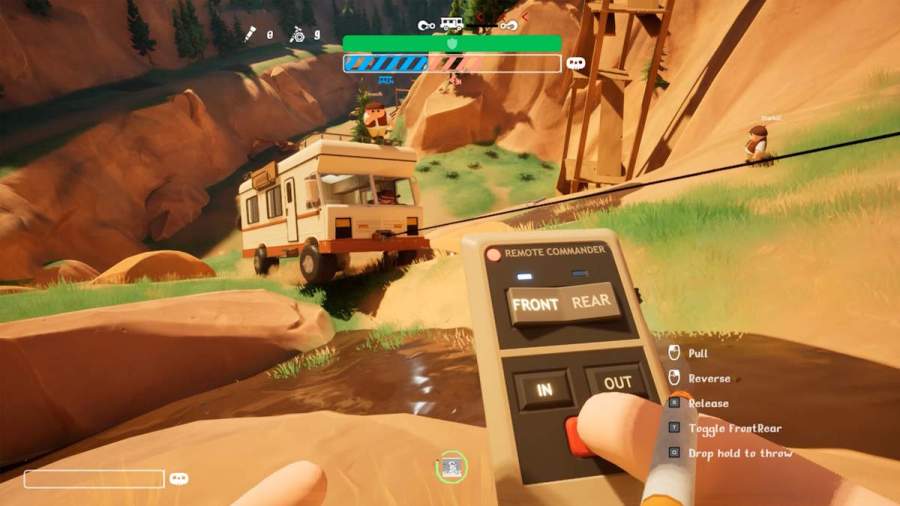
Creative setups for playing RV There Yet with larger groups
💡 Best Practices for 5+ Player Groups
💡 RV There Yet Developer Response: The RV There Yet developers have acknowledged community requests for 5+ player support in multiplayer, but as of now, there are no official plans to increase the RV There Yet player limit. The RV There Yet game's physics and balance are designed around 4 players.
⚠️ RV There Yet Common Multiplayer Mistakes
❌ "Lone Wolf" Syndrome
Mistake: Running off alone to explore or gather resources.
Fix: Always stay within visual/audio range of team. If you need to scout, announce it first and set a time limit.
❌ Resource Hoarding
Mistake: Taking all items for yourself instead of sharing with team.
Fix: Announce what you find and ask if anyone needs it more. Share EpiPens and engine oil equally.
❌ Not Calling Out Dangers
Mistake: Seeing a bear/cliff/hazard but not warning the team.
Fix: ALWAYS call out threats immediately, even if you think someone else saw it. Better to double-report than not report at all.
❌ Impatient Driving
Mistake: Driving too fast or not stopping when teammates need to act.
Fix: Patience saves RVs. It's a survival game, not a racing game. Slow and steady wins.
❌ Panic Communication
Mistake: Screaming "OH NO!" without explaining what's wrong.
Fix: Take a breath, then clearly state: WHAT happened, WHERE it is, and WHAT you need. "Bear at 2 o'clock, stop RV now!"
❌ Ignoring Role Responsibilities
Mistake: Driver trying to navigate, Navigator repairing engine - everyone doing everything.
Fix: Stick to your assigned role. Trust your teammates to handle their jobs. Too many cooks spoil the RV.
🏆 Keys to RV There Yet Multiplayer Success
Communication:
- ✓ Clear, concise callouts
- ✓ Acknowledge instructions
- ✓ Stay calm under pressure
Teamwork:
- ✓ Stick to assigned roles
- ✓ Share resources fairly
- ✓ Help teammates in need
Patience:
- ✓ Drive carefully
- ✓ Wait for teammates
- ✓ Don't rush decisions
Preparation:
- ✓ Assign roles before starting
- ✓ Test voice chat quality
- ✓ Review emergency protocols
💬 Join the RV There Yet Discussion
Have RV There Yet multiplayer questions or tips to share? Join our RV There Yet community discussion below! Share your RV There Yet experiences, ask questions, or help fellow RV There Yet players.